

IT Asset Tracking with Barcodes:
A Lifecycle Guide for Small and Mid-Size IT Teams
Short answerIT asset tracking means giving every laptop, monitor, phone and network device a unique tag. You then log each lifecycle event (purchase, assignment, move, repair, reclaim and disposal) against that tag. For small and mid-size teams, barcode or QR tags scanned with a phone, plus a system synced to your user directory, cover most of what an audit needs.
Key takeaways
- Track the lifecycle, not just the list. Every assignment, move, repair and return should be a scanned transaction with a date and a person attached.
- Hardware asset tracking and software asset management (licenses) are different jobs. Most small teams should get hardware right first.
- Syncing users from Active Directory or Google Workspace keeps onboarding and offboarding accurate, because devices can only be assigned to people who actually exist.
- Offboarding is where assets go missing. Make device return a required step before the final paycheck or account deactivation.
- Record disposal and data sanitization in the asset record. NIST SP 800-88 Rev. 2 (September 2025) is the reference for media sanitization.
What is IT asset tracking, and how is it different from software asset management?
IT asset tracking records the physical devices your organization owns: who has each one, where it is, what condition it is in, and what it cost. Software asset management (SAM) tracks licenses, installations and renewals so you stay compliant and avoid paying for unused seats. The two overlap, since a laptop “has” software, but they answer different questions:
| Aspect | Hardware asset tracking | Software asset management |
|---|---|---|
| Core question | Where is it and who has it? | Are we licensed for what's installed? |
| Unit tracked | Physical device with a tag and serial number | License, subscription, seat, installation |
| Main data source | Scans at receiving, assignment, moves, counts | Discovery agents, vendor portals, contracts |
| Main risk | Loss, theft, unreturned devices, ghost assets | Audit penalties, shelfware, missed renewals |
| Typical owner | IT ops / help desk, sometimes facilities or finance | IT procurement, security, finance |
If you are choosing where to start, start with hardware. Custody, loss and disposal carry the biggest financial and security exposure for most small teams.
What are the stages of the IT asset lifecycle?
Think of each device as moving through seven stages. Each stage should produce a scanned, timestamped transaction in your system.
| Stage | What happens | What to record |
|---|---|---|
| 1. Procure & receive | Device arrives against a purchase order | PO, vendor, cost, received date, warranty end, serial number |
| 2. Tag | Asset tag applied before the device leaves IT | Asset number linked to serial number and model |
| 3. Assign (onboarding) | Device checked out to an employee or location | Assigned person, date, condition, accessories issued |
| 4. Move | Transfers between people, desks, sites | From/to location, who moved it, date |
| 5. Maintain & repair | Repairs, warranty claims, upgrades | Ticket or work order, cost, vendor, downtime |
| 6. Reclaim (offboarding) | Device returned and checked in | Return date, condition, missing accessories, reimage status |
| 7. Dispose | Data sanitized; device recycled, resold or destroyed | Sanitization method, date, certificate, disposal method, sale value |
What fields should an IT asset record include?
Keep the required fields short so people actually fill them in. A practical minimum:
- Identity: asset number (on the tag), serial number, model, category (laptop, monitor, phone, switch)
- Financial: purchase date, cost, vendor, PO number, warranty end date, depreciation method if finance needs it
- Custody: assigned person (synced from your directory), department, location/site
- Status: in stock, assigned, in repair, retired, disposed
- Security: encryption confirmed (yes/no), MDM enrolled (yes/no), last reimaged date
- History: every transaction, generated automatically rather than typed
Link accessories, such as a dock, charger or monitor issued with a laptop, to the parent asset or track them as a kit, so they come back with the laptop.
How do you handle onboarding and offboarding without losing devices?
Offboarding is where most organizations lose hardware, especially remote employees who are never asked for their equipment back. Tie the device process to the HR and identity process.
Onboarding and offboarding procedure
- Sync users from your directory. Connect Active Directory or Google Workspace so new hires appear automatically and departed users are flagged.
- Prepare the kit before day one. Pull a laptop from stock, scan it, and reserve it for the new hire with the accessories.
- Check out on day one. Scan the tag, assign it to the employee, record the condition and, if your policy requires it, capture a signature.
- Trigger a return on the resignation date. Generate a list of everything checked out to that person, including accessories.
- Check in and inspect. Scan each returned item, record condition and missing parts, and set the status to “reimage pending.”
- Close the loop. Only deactivate the account and close the offboarding ticket when the person’s checked-out list is empty, or when the unreturned items are documented as a loss.
Octo Consulting Group, an IT services firm serving federal agencies, faced this during a hiring boom. It bought and redistributed hundreds of assets worth more than $200,000 while relying on spreadsheets. As the team put it, “We preferred to manage time more efficiently, rather than purchase more assets to meet demand.” After moving to barcode-based tracking with check-in/check-out and Active Directory integration, staff stopped hunting for devices manually and new-hire provisioning became faster (case study).
Should IT asset tags be barcodes or QR codes?
For most small and mid-size IT teams, barcode or QR tags scanned by a phone camera are enough and cost the least. Guidelines:
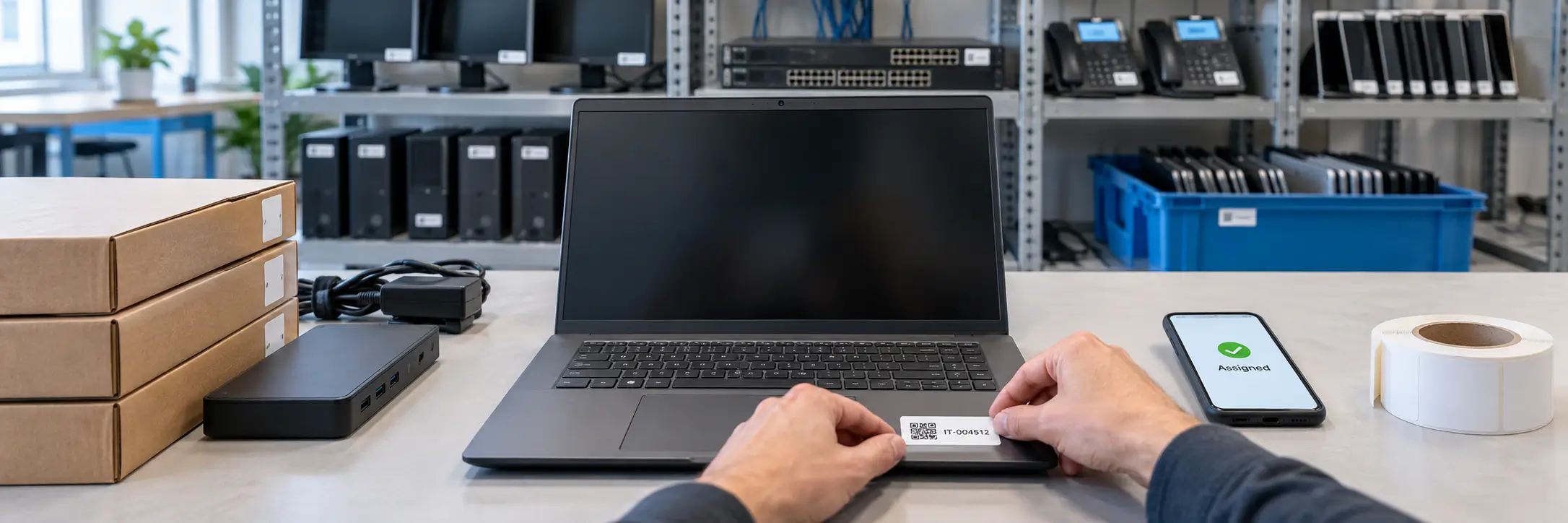
- Use a unique, meaningless asset number (e.g., IT-004512), not a person’s name or location, since those change.
- Use tamper-evident polyester or metalized labels for laptops, which get handled constantly. Paper labels wear off.
- Place the tag somewhere visible when the device is in use, such as the lid underside or base, and away from vents.
- Use a 2D barcode such as a QR code when space is limited, since it can fit into a smaller area than a rectangular 1D barcode and can be read by phones or 2D imaging scanners.
BarCloud sells scanners, Zebra label printers and durable label stock, and its label design wizard prints asset tags in-house (scanners, printers & labels).
How often should you audit IT assets?
A practical cadence for small and mid-size teams:
- Quarterly cycle counts of high-risk, portable items (laptops, phones, tablets), done by scanning a subset of sites or departments each time.
- An annual full audit of everything, reconciled against the records, with “not found” items investigated.
- An event-driven check after office moves, layoffs, mergers or a security incident.
If your organization receives federal awards, equipment bought with those funds must also be physically inventoried and reconciled at least once every two years under 2 CFR 200.313(d)(2). Cycle-count tools that sort results into found, not yet found and unidentified make reconciliation much faster. BarCloud’s asset cycle counts use exactly those categories.
How should IT teams dispose of devices securely?
Disposal is both a data-security event and a record-keeping event. NIST published SP 800-88 Rev. 2, Guidelines for Media Sanitization in September 2025. It superseded Rev. 1 from 2014 and helps organizations set up a sanitization program matched to data sensitivity, including techniques such as cryptographic erase. In your asset system:
- Set the status to “retired,” then record the sanitization method, date and technician.
- If an IT asset disposition (ITAD) vendor handles the device, attach the certificate of sanitization or destruction.
- Record the disposal method (recycle, resale, donation, destruction) and any sale value, which finance needs for depreciation write-offs.
- Keep the record as “disposed.” Never delete it, because auditors look for the trail.
Which IT asset tracking approach fits your team size?
There is no single right tool. Here is a fair comparison of the common approaches. Check current features and pricing with each vendor.
| Approach | Best fit | Strengths | Trade-offs |
|---|---|---|---|
| Spreadsheet | Under ~15 devices, one IT person | No-cost, familiar, flexible | No history, no scanning, breaks with multiple editors and sites |
| Open-source ITAM (e.g., Snipe-IT) | Teams with in-house technical skills | Free and open source, IT-focused, check-out/check-in | Self-hosting and upkeep fall on you (the vendor also offers a hosted option) |
| Enterprise ITAM / ITSM suites | Large IT organizations with a service desk | Discovery agents, license management, ticketing integration | Heavier implementation and cost; can be more than a small team needs |
| Barcode asset tracking platforms (e.g., BarCloud) | Small to mid-size teams tracking IT plus other equipment | Phone scanning, check-in/check-out, cycle counts, directory sync, can also track non-IT assets and consumables | Not a license-discovery tool; pair with SAM if licenses are the main problem |
BarCloud's asset tracking system covers the hardware lifecycle above: check-out/check-in with reservations and alerts, maintenance scheduling, depreciation, disposal, and iOS and Android apps that use the phone camera as a scanner. Active Directory and Google Workspace integrations and the API are included on the Standard and Professional plans, and SAML 2.0 single sign-on is available on Professional. See the IT asset tracking page for details.
Frequently asked questions
What is IT asset tracking?
IT asset tracking is the practice of recording every piece of IT hardware (laptops, monitors, phones, network gear) with a unique ID, and logging who has it, where it is, and what state it is in from purchase through disposal.
What is the difference between IT asset tracking and software asset management?
IT asset tracking usually focuses on physical hardware and its custody and location. Software asset management (SAM) tracks licenses, installations and entitlements to stay compliant and avoid over-buying. Many teams start with hardware tracking and add license tracking later.
Should I use barcodes or QR codes for IT asset tags?
Either works. What matters is that every tag carries a unique asset number that your system recognizes and that the label material survives the environment. QR codes store more data and scan well from phone cameras; 1D barcodes are compact and read quickly by dedicated scanners.
How often should IT assets be audited?
A common cadence is a full physical audit once a year plus rolling cycle counts of high-risk items such as laptops and phones each quarter. Organizations with federal awards must also meet the at-least-every-two-years physical inventory rule in 2 CFR 200.313 for equipment bought with those funds.
Is a spreadsheet enough for IT asset tracking?
For a very small team with around 15 devices and one IT person, a well-structured spreadsheet can work. Once devices are shared, move between sites, or are assigned and reclaimed during hiring and turnover, spreadsheets lose history and accuracy, and a dedicated asset tracking system becomes more useful.
Can employees see and manage the IT equipment assigned to them?
Yes. BarCloud's My Work Assets gives employees web and mobile access to the equipment assigned to them. They can see what they currently have checked out, identify overdue items, browse and request available equipment, and submit maintenance or repair requests for devices in their possession.
How should I dispose of old laptops safely?
Sanitize storage media using a method matched to data sensitivity, following NIST SP 800-88 Rev. 2 (Guidelines for Media Sanitization, September 2025), record the sanitization and disposal in the asset record, and keep the certificate from any ITAD vendor.
Sources
- NIST, SP 800-88 Rev. 2, Guidelines for Media Sanitization (September 2025)
- eCFR, 2 CFR 200.313 Equipment
- Snipe-IT, Free open source IT asset management
- BarCloud, Octo Consulting Group IT asset tracking case study
- BarCloud, Integrations
Tired of chasing laptops at offboarding?
BarCloud syncs users from Active Directory or Google Workspace, checks devices in and out with a phone scan, and keeps a full history for every asset.
How can we help?
Quick actions to find your perfect inventory system.
How can we help?
Quick actions to find your perfect inventory system.
Download the 2026 Comparison Guide
Get the full feature-by-feature breakdown — pricing, integrations, and ratings included.
Schedule a Free Consultation
An inventory expert will guide you through your options based on your specific needs.
Get a Demo & Free Trial
See how BarCloud's inventory system fits your business — book a personalized walkthrough.
Request a Quote
Tell us about your business and we'll send pricing tailored to your inventory needs.
Your download is starting…
If it doesn't begin automatically, click below.
Download PDFThanks — we'll be in touch.
A BarCloud specialist will reach out within one business day.