



Stay Informed About Your Inventory
Track Inventory from Receiving to Use and Transfer
Good inventory tracking requires good planning. BarCloud supports key inventory workflows, including receiving items into stock, issuing inventory for use, moving stock between locations, and conducting physical inventory counts. These workflows help organizations maintain inventory records, review stock availability, and document changes as items move through their operations. Available features depend on the system and configuration.

Building Your Inventory System
A Feature for Every Occasion
Our inventory management software offers a range of features to support different inventory workflows. Feature availability depends on the solution and configuration selected, allowing organizations to identify the tools that fit their operations.
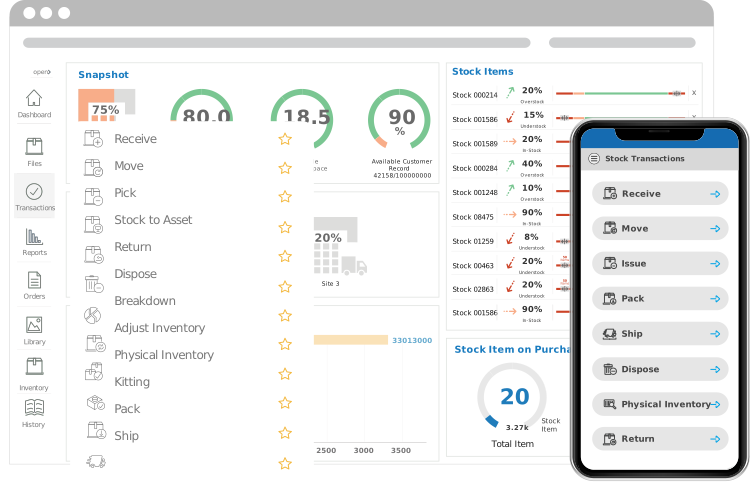
Base Inventory Features
Core Features for Managing Inventory
These features form the core functions of our software and come baseline with every system. Here is a brief overview of each feature and how it can be applied.
Physical Inventory Count
Physical Inventory provides a view of current inventory records and supports inventory counting to help users compare recorded stock with what is physically on hand.
Min & Max Quantities
Min/Max Locations creates configurable minimum and maximum stock levels for each location, helping users identify when stock levels may need attention.
Picklist
Inventory Picklist generates a list of items needed for a customer order, allowing warehouse staff to fulfill orders faster and more easily.
Ai - Forecasting
Forecasting/Artificial Intelligence helps users review inventory demand trends and plan for potential changes in demand.
Inventory Reporting
Inventory Reporting provides standardized reports and can also generate configurable reports, leading to easy and timely inventory reports.
Note and Flag
Inventory Note & Flag creates virtual sticky notes that can be attached to important items. This feature is useful for adding time-stamped notes to inventory records and transactions, or flagging frequently used items for easier access.
Alerts
Inventory Alerts can create custom-built alerts, notifying you of important deadlines such as when to resupply or perform maintenance.
Pack and Ship
Inventory Pack & Ship selects items ready to be shipped and prints a packing slip for the order. Then, when an item is ready to be shipped, it prints a shipping label using the recipient’s imported information.
Data Import
Data Import helps users bring inventory data into the system from external files or other systems. Confirm the current supported file formats, import options, and field-mapping workflow before publishing more specific details.
User Security
User Security gives administrators the ability to create multiple levels of access and authorize specific users accordingly to keep assets secure. In addition, the feature can also create security groups, enable restricted access, and prevent sensitive information from being edited
Transactions Receipts
Transaction Receipts create downloadable and printable receipts. These can be obtained whenever a transaction is picked, received, returned, moved, and disposed. The feature also modifies receipt format, allowing for integrated and easy bookkeeping.
UPC LookUp
UPC Look Up automates data entry when receiving barcoded items. The feature can use online UPC databases to help populate item information without having to leave the system. Verify current database integrations and lookup behavior before publishing this claim.
Inventory Receiving
Receiving inventory records items as they arrive and allows users to enter quantities and assign locations. Depending on the configured workflow, users can also record details such as units of measure, serial numbers, lot identifiers, and relevant dates. Receiving workflows help establish accurate stock records at the point of intake.
Issue Inventory
Issue Inventory records items issued for use or consumption. When inventory is issued, available quantities are updated and the transaction history can record who issued the items, when they were used, and where they were allocated.
Advanced Inventory Features
Additional Features to Fit Your Operations
These features can be purchased as add-ons to tailor our system and ensure it’s a perfect fit for your operations.
Inventory Breakdown
Inventory Breakdown disassembles a selected item in your inventory into individual separate components. These parts can then be assigned a unique stock number allowing users to track each component in greater detail.
Inventory Transfer
Inventory Transfer supports moving inventory between separate sites or inventory systems when the appropriate Multi-Site or Enterprise setup is in place. The documented workflow includes a transfer request, a transfer-out transaction, and a transfer-in transaction. This allows organizations to document inventory movement between locations while maintaining transaction records. For inventory that is moved between locations within a system while remaining available in stock, the Move Inventory workflow may be more appropriate. Confirm which workflow applies to each deployment before publishing.
Kitting/Assembly
Inventory Kitting groups separate but usually related items under a single barcode, allowing items that typically go together to form a single unit to be requested and assembled easily.
Blueprint layout
Inventory Layout creates a blueprint of physical storage locations. This allows managers to quickly visualize their available space by providing a floor plan and a search tool to locate items with ease.
Inventory Requisition
Inventory Requestor allows users to view, request, and receive inventory. Administrators are also able to use multiple levels of authentication to provide customized security for every item.
Signature Capture
Signature Capture can create specific checkpoints in a transaction in which an electronic signature is required. This is perfect for streamlining auditing processes and improving accountability overall.
Stock to Assets
Stock to Asset reclassifies eligible stock items as assets while carrying over identifying information, reducing the need to re-enter the same information manually. Using this feature ensures that an asset will be tracked from the moment it arrives at the warehouse to the moment of its retirement.
Adjust Inventory
Adjust Inventory creates a digital log for adjusting inventory. This feature is useful for correcting discrepancies between recorded and actual stock levels, with transaction notes and records of who made an adjustment and when.
Approval Cycles
Approval Cycles oversees the process of receiving purchase orders and sales orders. It integrates the process of approving the order by requiring orders to go to designated approvers. This provides a greater degree of control over the fulfillment process by creating check points where approval is needed.
Additional Inventory Features
Explore More Tools for Inventory Visibility and Planning
These features provide additional ways to review inventory history, monitor stock levels, and manage storage capacity. Confirm current availability and release status before describing them as new.
Historical Inventory
Historical Inventory compiles historical inventory data and uses it to generate configurable reports on item history. This allows the user to compare stock items between two dates and review changes in inventory over time.
Min/Max Scaler
Min/Max Status Scale provides a visual scale of how much inventory is available. By setting minimum and maximum values, staff can determine instantly when an item is below its minimum or above its maximum stock level. Items can also be attached to the dashboard.
Vacant Locations
The Vacant Locations feature helps users review available storage space and identify empty locations across supported facilities. Depending on the system setup, it can also provide information about location capacity and vacancy reporting.