



Track Inventory Movements
Our Inventory System automates inventory movements, ensuring your items are tracked accurately as they move between locations—whether across shelves, storage areas, job sites, or facilities. With our Barcode Inventory System, you’ll always know where your inventory is located while keeping it available for future use.

The Benefits of Automating Inventory Movements
Reduce Human Error
Standardized movement workflows minimize misplaced inventory and improve accuracy across all locations.
Increase Efficiency
Automated inventory transfers reduce manual data entry, phone calls, and spreadsheets used to coordinate inventory movement.
Enhance Data Visibility
Gain immediate insight into inventory locations and availability as items are transferred between sites.
Improve Accuracy and Reliability
Ensure inventory data stays up to date during transfers, reducing discrepancies caused by delayed updates.
Streamline Inventory Operations
Simplify internal transfers so teams can focus on operational priorities instead of manual inventory tracking.
Improve Compliance Standards
Maintain a clear record of inventory movement to support audits, internal controls, and compliance requirements.
Why Use Our Inventory System to Manage Inventory Movements?
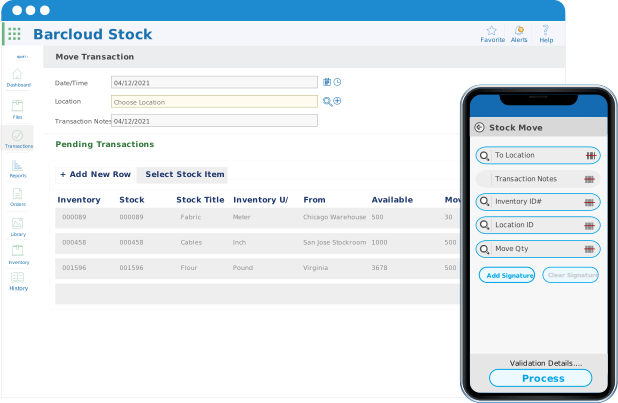
The Move Transaction simplifies inventory transfers between locations while keeping items available in stock. Each movement is logged with user, date, and location details, giving teams a reliable way to track inventory movement without losing visibility or control.
Centralized Inventory Visibility Across Teams and Locations
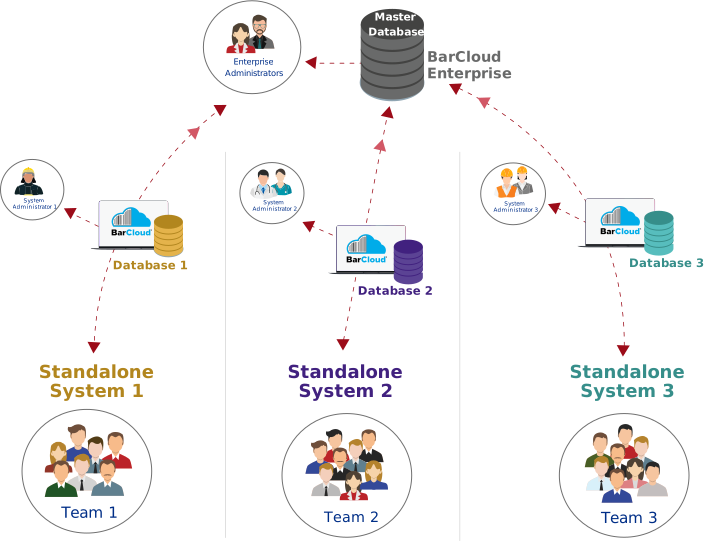
BarCloud provides a centralized inventory system that connects multiple teams, locations, and databases into a single source of truth. Whether you operate one site or many, all inventory activity is synchronized in real time, giving administrators complete visibility while allowing individual teams to work independently within their own environments. Inventory movements are tracked seamlessly across locations without breaking availability, so teams always know where inventory is and where it’s going.
How to Move Inventory Using the Mobile App
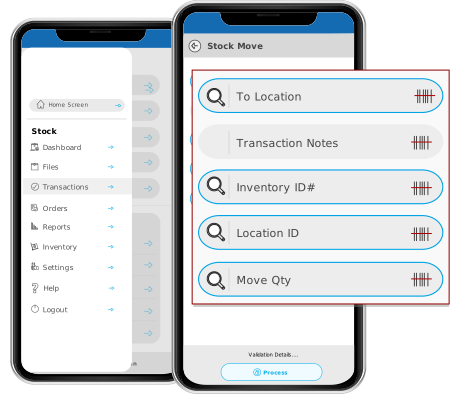
With our mobile app, inventory can be moved directly from the warehouse floor, station, or job site.
Compatible with both iOS and Android devices, users can scan barcodes or enter quantities to complete inventory transfers in real time, eliminating delays and keeping records accurate without returning to a workstation.
FAQs
What is move inventory?
Move inventory refers to transferring inventory items between locations while keeping them available for future use. Quantities are updated at both the source and destination locations in real time.
When should I use Move Inventory instead of Issue Inventory?
Use Move Inventory when items are relocated but remain in stock. Use Issue Inventory when items are used or permanently removed from inventory.
Does moving inventory update stock levels automatically?
Yes. Inventory quantities are updated automatically at both locations when inventory is moved, ensuring accurate availability and location tracking.
Can inventory be moved using barcode scanning?
Yes. The Move Inventory feature supports barcode scanning, allowing users to quickly transfer inventory between locations with fewer errors.
Can I move inventory using the mobile app?
Yes. Inventory can be moved directly from the mobile app on iOS or Android devices, making it easy to complete transfers from the warehouse floor, job site, or field location.
Who typically uses the Move Inventory feature?
Move Inventory is commonly used by Fire & EMS departments, military organizations, construction teams, IT departments, and maintenance teams that need to track inventory across multiple locations.
Can Picklists be used with Move Inventory?
Yes. Picklists can be used to move multiple items in a single workflow, helping teams transfer inventory more efficiently while reducing manual entry.