



Product Kitting Made Easy with Our Inventory Control Software
Combining multiple items into a set
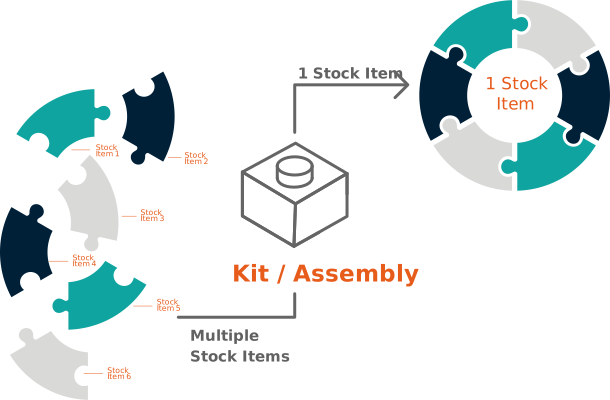
Our industry-leading Inventory Management Software brings users the ability to combine or assemble multiple inventory items through our Kitting feature. Also known as product kitting or product assembly, this is the process of bundling separate items that are frequently assembled together into a single packaged unit. Users get to pick specific items and combine them into a single SKU or group.
Streamlining Your Assembly Process
Efficiently process swift kitting order fulfillment
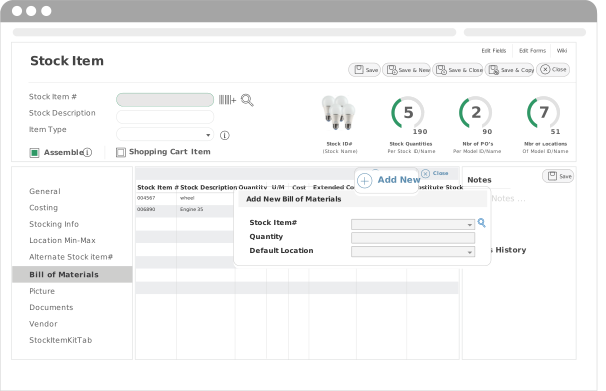
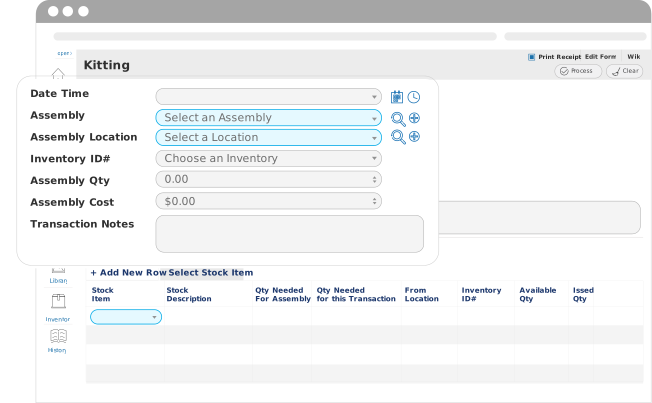
In our user-friendly Inventory Tracking Systems, the kitting process is fairly straightforward. Users can easily select different inventory items and combine them into one overall group. This can be done with the “Bill of Materials” in our systems, basically the recipe for an object, with ingredients being inventory items.
Here’s How to Use the Kitting Feature
Learn about the steps needed to bundle inventory items in our systems.
Define the kit
This is when you or your employees get the recipe, also known as the Bill of Materials, In order.
Creating the kit
This is where you or your employees specify the quantities of inventory items needed for your assembly.
Substitute if necessary
If the available on-hand inventory isn’t enough for the assembly, users can designate replacements for the unavailable item.
Process the request
Now, you can scan items in your warehouse or stockrooms according to what your kit needs, making it a less time-consuming task.
Configuring Your Kitting Settings
Learn how to adjust the Inventory Kits configuration.
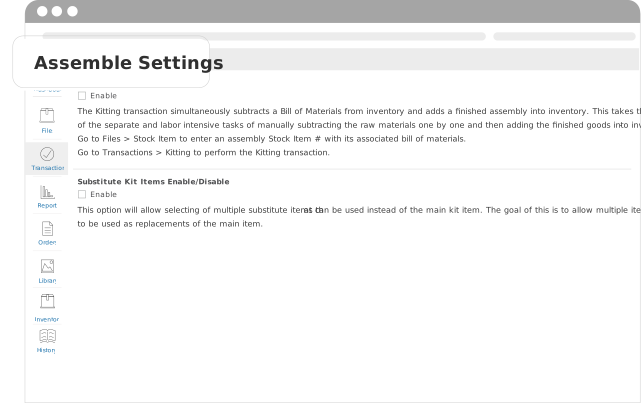
Users can choose to either Enable or Disable the ability to create multi-component product kits or substitute unavailable kit items. With the substitute option enabled, you can select possible replacement items that can be used in the event of unavailable main kit items.
Generate reports on Your Inventory Kits
Maximize inventory data visibility to understand your inventory
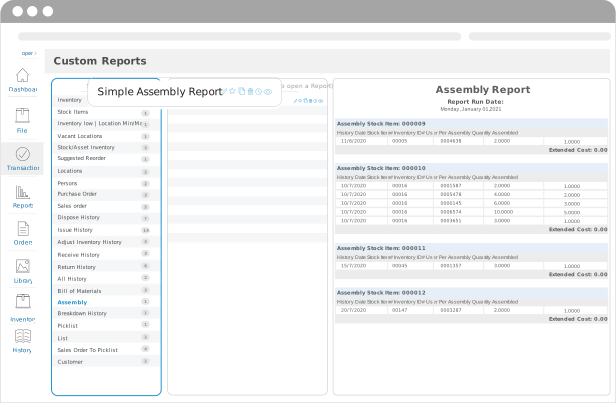
You can generate configurable Kitting Reports for extended visibility on your inventory consumption trends. If you or your employees would like to view the history of certain Kits or assembly processes from a certain time period, our system can automatically generate and email such reports on a predetermined delivery schedule.
Product Kitting Software That Simplifies SKU Bundling and Inventory Control
BarCloud’s kitting feature is a built-in inventory kits management capability that allows your teams to standardize bundles and assemblies under one SKU or grouped set. This cuts down on the amount of tedious “bundle math” they have tomust do in kitting operations. Because kits are built within the system from a repeatable recipe using a Bill of Materials, inventory consumption is consistent every time a kit is created.
Our inventory kitting software provides you with greater accuracy and inventory control because component quantities are automatically adjusted. This keeps your on-hand inventory levels reliable and prevents silent stockouts. If any component is unavailable, approved alternatives can be slotted in seamlessly to keep kit creation workflows moving while maintaining the integrity of your inventory tracking. With detailed kitting reports, you can see which bundles drive the most inventory usage, ensuring you can adjust kit composition, reorder points, and stock levels based on demand.
Not just for inventory control
Explore what else you can do with our systems
We also offer options for asset management software or combined solutions that manages both inventory and assets. We have the perfect long-term solutions to grow and scale up your business, no matter the size. Learn more about what options may work best for you through our demos!
FAQs
When should I use the inventory kitting feature instead of tracking items separately?
Kitting is perfect for when you regularly bundle or assemble the same group of items. This reduces the manual kit assembly steps because your staff can select a kit instead of picking each SKU from scratch.
How does BarCloud handle Bills of Materials for kits?
Our platform uses BOMs as “recipes” for kits, listing all required items and their quantities. This reduces manual errors and supports repeatable assemblies while ensuring correct consumption of components.
Can kits be created if some components are out of stock?
Yes, BarCloud supports kitting substitution management for any unavailable kit items with the setting enabled. Approved substitutes help maintain kitting workflows while keeping inventory control as accurate as possible. Substitute items are tracked within the system just as the standard items are.
What can kit consumption reporting tell me about inventory usage?
Accurate kitting inventory reports provide visibility into kit consumption trends and component usage over time. This supports key inventory management decisions and reduces reliance on manual kit component tracking through spreadsheets.